
Where Should a Small Business Start With AI?

You finish a busy day with three customer enquiries still unanswered. The information needed to reply is somewhere in your inbox, a document, or a colleague’s head. Meanwhile, another AI tool is promising to transform your business.

It is easy to feel that you should already be using more of it. Deciding where to begin is harder when every demonstration looks useful and your team has little time to experiment.

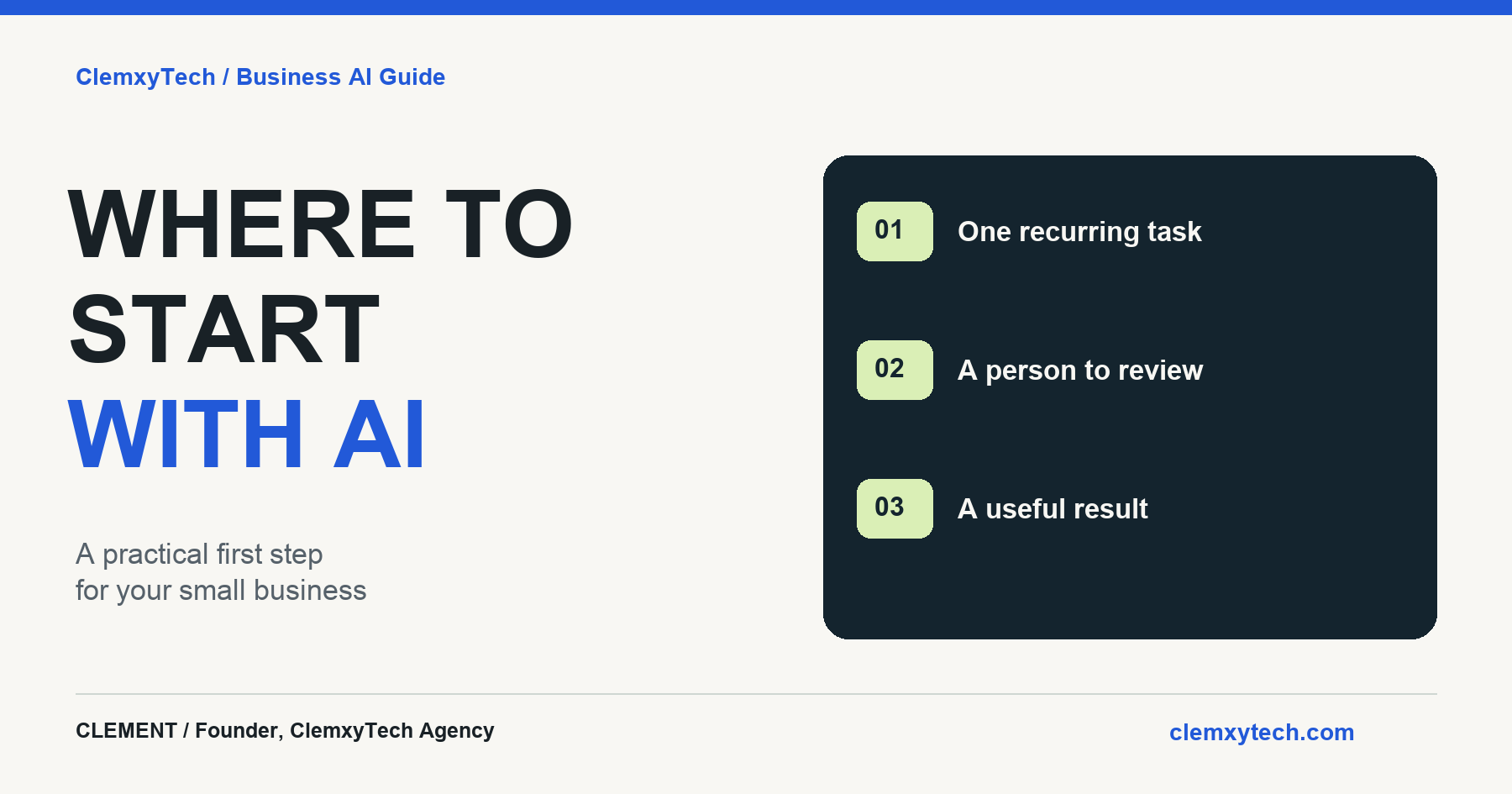
For a small business, I would start with one recurring task that someone understands well enough to check. Give AI a limited role in that task, see whether it helps, and use what you learn to decide the next step. You do not need to redesign the company before you can find out whether it is useful.

Start with the work that keeps coming back

Think about the work that regularly interrupts your day. Perhaps customers ask the same questions before booking. Perhaps someone spends Friday afternoon turning notes into a weekly update. Or perhaps every new project starts with searching through old files for information you have already written.

Choose a task you can describe in a few ordinary sentences. “We need AI for customer service” leaves too much open. “We need help preparing replies to enquiries about our existing services” gives you something concrete to examine.

Consider a small service business receiving enquiries through its website. Each message needs to be read, checked against the services offered, and passed to the right person. Some customers have included everything needed for a response. Others have left out the deadline, location, or scope of the job.

Before adding AI, watch how a team member handles a few of those messages. Find out where they look for answers and what makes them hesitate. You may discover that the difficult part is an outdated price sheet or an unclear booking policy. Fixing that will help the team and any software you introduce.

Your first AI tool may already be close at hand

You may be able to try a suitable task using an approved AI feature in software your business already uses. Before adding another subscription, check what is available, what it costs, and whether its data settings fit the information you plan to use.

For the enquiry example, an early trial could be as modest as asking AI to summarise a sample message, identify missing details, and prepare a reply from an approved service description. A person reads the result and decides what to send. There is no need to connect the whole inbox on the first day.

Use invented examples or properly anonymised material while exploring the idea. Removing a name alone may leave other identifying details in a message. Keep live customer information out of the trial until you have checked the provider’s terms, retention settings, access arrangements, and your own obligations.

You also need to know what the tool is allowed to rely on. Give it a current service description and a clear instruction to flag missing information. If it cannot find a delivery commitment or a price, it should leave that question for the team. A polished reply that invents a promise creates more work than it saves.

Decide how much of the task needs AI

There are parts of an enquiry process that ordinary software can handle quite well. A website form can collect a phone number. A fixed rule can assign messages from a particular form to a particular team. A notification can alert the owner when a new request arrives.

AI becomes a candidate where the information varies and someone needs help interpreting it. A customer might describe a problem in a long paragraph without naming the service they need. Turning that message into a short briefing is a different job from copying a form field into a spreadsheet.

An AI agent goes further by using a model to direct steps and choose tools as it works. OpenAI’s practical guide to building agents advises checking whether a task needs that flexibility before building one. For clear, repeatable steps, conventional automation may be sufficient.

That leaves room for a simple combination: fixed rules organise incoming messages, AI prepares a summary, and a team member handles the reply. Anthropic’s guidance on effective agents similarly recommends starting with the simplest approach that meets the need. Additional autonomy brings costs and complexity that should earn their place.

If the terminology is getting in the way, our guide to AI agents and chatbots explains the difference in more detail. Choose the approach after you understand the task.

Keep someone close to the result

The person who normally does the work should help judge the trial. They will notice a wrong service recommendation, an awkward reply, or a missing question that a convincing demonstration can conceal.

Ask them to use the draft alongside the normal process. Can they find the original message easily? Can they see which information is missing? Does correcting the draft take less effort than writing the reply themselves? Make it easy to reject the suggestion and continue working.

A useful first boundary is to let the system prepare material while a person approves anything sent to a customer. Agree who checks the output and what happens when that person is unavailable. The trial should have an owner who can stop it when something goes wrong.

Risk deserves attention while the process is being designed. NIST’s AI Risk Management Framework treats trustworthiness as a consideration throughout the design, use, and evaluation of AI systems. For this example, that means thinking about customer information and incorrect commitments before allowing a tool to act on either.

Look for a better working day

A fast first draft can be encouraging. Follow it through to the finished task before deciding that the trial works. If staff spend the saved time checking unsupported claims or moving information between screens, the overall improvement may be small.

Keep a simple record of the time needed to prepare, check, and complete a reply. Note the corrections and the kinds of enquiry the tool struggles with. Compare that with how the task worked before, including the quality of the final response.

Include the ordinary costs too: subscriptions, usage charges, setup, staff learning time, and the effort of keeping service information current. You are looking for a result that remains useful after the demonstration is over.

There may be enquiries the system handles well and others you decide to leave entirely with a person. That is a useful finding. It gives you a clearer boundary for the next version instead of an assumption that the tool should handle everything.

Bring one real problem to the conversation

You do not need a technical specification to ask for help. A description of the task, the software involved, and an example of where the work slows down is enough to begin a useful discussion. If you have already tried an AI tool, bring what worked and what disappointed you.

At ClemxyTech, I bring together website development, automation, and AI work to help businesses connect the tools they use with the work they need to get done. You can meet Clement and explore my projects and experience before getting in touch.

If your team keeps losing time on the same task, let’s look at it together. Book a free initial consultation and tell us where the work gets stuck. We can discuss whether a small AI feature, a straightforward automation, or a change to the process is a sensible place to start.

We respond to consultation enquiries within two business days.
How AI Evolved: From Predictive Models to Generative AI and Agents

A retailer deciding how much stock to order, a freelancer preparing a proposal, and a sales team following up an enquiry might all be using AI. The software could be doing quite different jobs in each case.

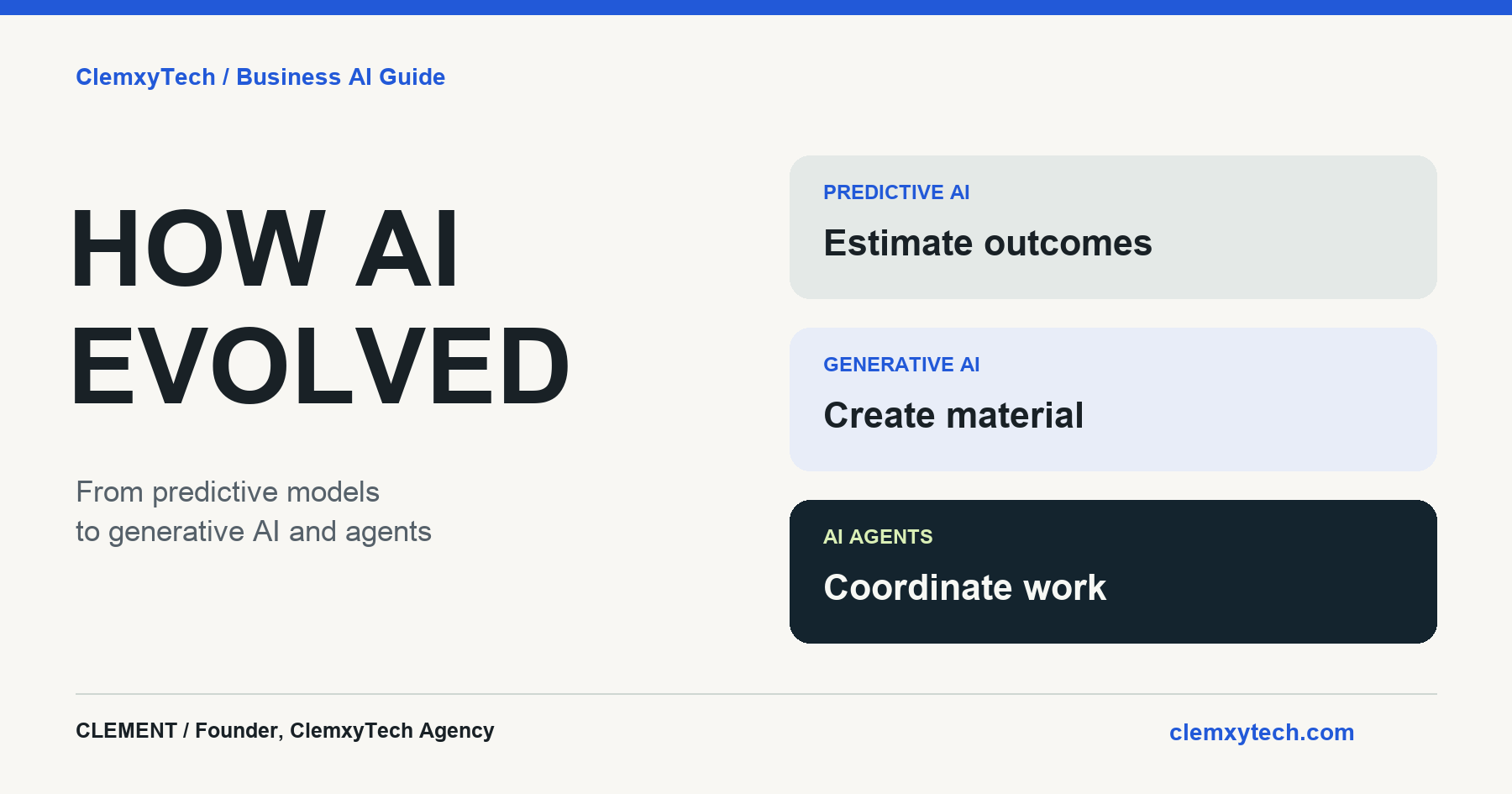
One system estimates what is likely to happen. Another produces a draft. A third can work through a task using connected tools. Much of the confusion around AI comes from treating those capabilities as though they were interchangeable.

Following the development of AI makes the differences easier to understand. It also helps answer a practical question: what kind of help does your business actually need?

AI was working long before the chat window

Before conversational tools became widely familiar, businesses were already using statistical and machine-learning models to work with patterns in data. Predictive AI estimates outcomes such as likely demand or the chance that a customer will leave. IBM’s explanation of predictive AI describes this use of historical information to anticipate possible outcomes.

For our retailer, that might mean looking at previous sales, seasonal changes, and other relevant information to estimate how much stock to buy. The output is a forecast. Someone still has to decide how to use it, taking account of the budget, storage space, and what is happening in the business.

Deep learning expanded what models could recognise in complex inputs. One important result came in 2012, when Alex Krizhevsky, Ilya Sutskever, and Geoffrey Hinton reported a deep neural network for image classification, trained using GPUs. Their ImageNet classification paper documented a substantial improvement over earlier results on that benchmark.

That was an advance in recognising patterns in images. It was not a general-purpose business assistant. Different systems continued to be built for different tasks, and their usefulness depended on the information available and how their output was put to work.

Language made AI easier to work with

A major development in language modelling arrived in 2017 with the Transformer architecture. Its attention mechanism helps a model represent relationships between parts of a sequence. Google’s original explanation of the Transformer showed how this could be applied to translation and language understanding.

The significance for a business owner is easier to see in the tools that followed. Instead of working only through specialist interfaces, people could increasingly describe a task in ordinary language and receive a useful response.

OpenAI introduced ChatGPT on 30 November 2022 as a conversational model that could respond to follow-up questions. The original launch announcement also acknowledged that it could produce plausible but incorrect answers. Ease of use and reliability were separate questions from the beginning.

Generative AI creates material such as text, images, or code. A freelancer can use it to prepare a first draft of a proposal or explore possible approaches to a project. The freelancer still needs to understand the brief, check the work, and make decisions about what to deliver.

The distinction between predictive and generative AI is mainly about the task and the intended output. Generative language models also use prediction internally as they produce text. A useful business distinction is whether you need an estimate about an outcome or material that someone can review and use.

A good draft still leaves work to do

Consider a supplier enquiry arriving at a small business. A language model might summarise the message and suggest a reply. That can help the person handling the inbox, but the message still needs to be checked against current stock, delivery commitments, and the customer’s actual request.

If the user has to copy information between the inbox, a spreadsheet, and a customer record, the surrounding process remains largely manual. Improving the draft solves one part of the job.

For freelancers, the same distinction matters. Producing a page of copy quickly does not settle the audience, the offer, or whether the information is accurate. Generating code does not establish that it meets the client’s requirements or works properly with the rest of the application.

This is where an AI implementation can disappoint. The output looks impressive, while the people responsible for the work are still doing the same checking, copying, and chasing as before. A useful evaluation follows the task all the way to completion.

Agents connect the model to a wider task

An AI agent adds a degree of model-directed control over the work. Rather than responding once and stopping, it can select a tool, inspect the result, and choose another step towards a goal. OpenAI’s practical guide to building agents describes models, tools, and instructions as the core components, with boundaries around how the system operates.

In an illustrative sales workflow, an agent could review an enquiry, look for relevant information in approved records, and prepare a briefing for the team. If an important detail is missing, it could ask for it or leave the task for a person. The design should specify whether it can only prepare a response or also send one after approval.

Connecting a model to tools does not automatically make every workflow agentic. A process can use AI to interpret a message while ordinary code controls every subsequent step. Anthropic’s guide to effective agents makes this distinction between predefined workflows and agents that direct their own tool use. It recommends increasing complexity only when the task needs it.

For a business, that distinction affects testing and responsibility. A fixed process follows an agreed route. A model-directed system needs room to choose a route, together with clear limits on what it may access and change. If you are weighing the options, our guide to AI agents and chatbots looks more closely at implementation.

The newer approach does not replace every older one

A retailer could use a predictive model to estimate demand, generative AI to draft a purchasing summary, and an agent to gather the information needed for a review. A person might approve the order. Those capabilities can sit in the same process.

Equally, a shop may only need a reliable stock alert. A small agency may only need incoming enquiries organised properly. Adding more autonomy would need a clear reason, because someone will have to maintain and supervise the system.

My starting point for this kind of work is the process itself. Where does information enter? What needs to happen next? Which decision takes up a person’s time? What would make the result dependable enough to use? Those questions are more helpful than choosing a tool first.

That is the connection between the history of AI and a sensible business decision today. The range of available capabilities has grown. Choosing well still depends on understanding the work.

What this means for businesses and freelancers

For a business owner, the next useful step is to identify one process that is causing a recurring problem. It could be a slow response to enquiries, a report that takes too long to prepare, or information that staff keep having to find again. Describe the current process before deciding how much of it AI should handle.

For a freelancer, it is worth examining where your judgment contributes to the result. You may use AI to research an approach or prepare material, while taking responsibility for the brief, the implementation, and the final checks. Be able to explain those contributions to a client.

You can see how I bring together website development, full-stack products, automation, and AI quality work on my Clement page. It includes my project portfolio and background, so you can get a clearer picture of the person behind ClemxyTech.

If you have a business process you would like to improve, bring us the actual task. Tell us which tools your team uses, where the work gets stuck, and what a useful outcome would look like. We can discuss a practical starting point in a free initial conversation.

Our team responds to consultation enquiries within two business days.
AI Agents vs Chatbots: What Every Business Should Know Before Implementation

A customer visits your website after closing time and asks whether you can help with a project. Your chatbot explains your services, collects an email address, and promises a reply. That may be exactly what your business needs.

Now imagine the same conversation leading to a search of your project records, a check of your team’s availability, and a draft proposal for someone to review. The conversation looks similar. The work happening behind it is very different.

That difference matters when you are choosing between an AI agent and a chatbot. It affects the systems you connect, the permissions you grant, the budget you need, and who takes responsibility when something goes wrong.

Before buying software or commissioning a build, decide what a successful customer interaction should actually accomplish.

If you already have a workflow in mind, book a free consultation with ClemxyTech. Tell us where the work gets stuck, and we can discuss whether a chatbot, an agent, or a simpler automation fits the job.

The difference is in who decides the next step

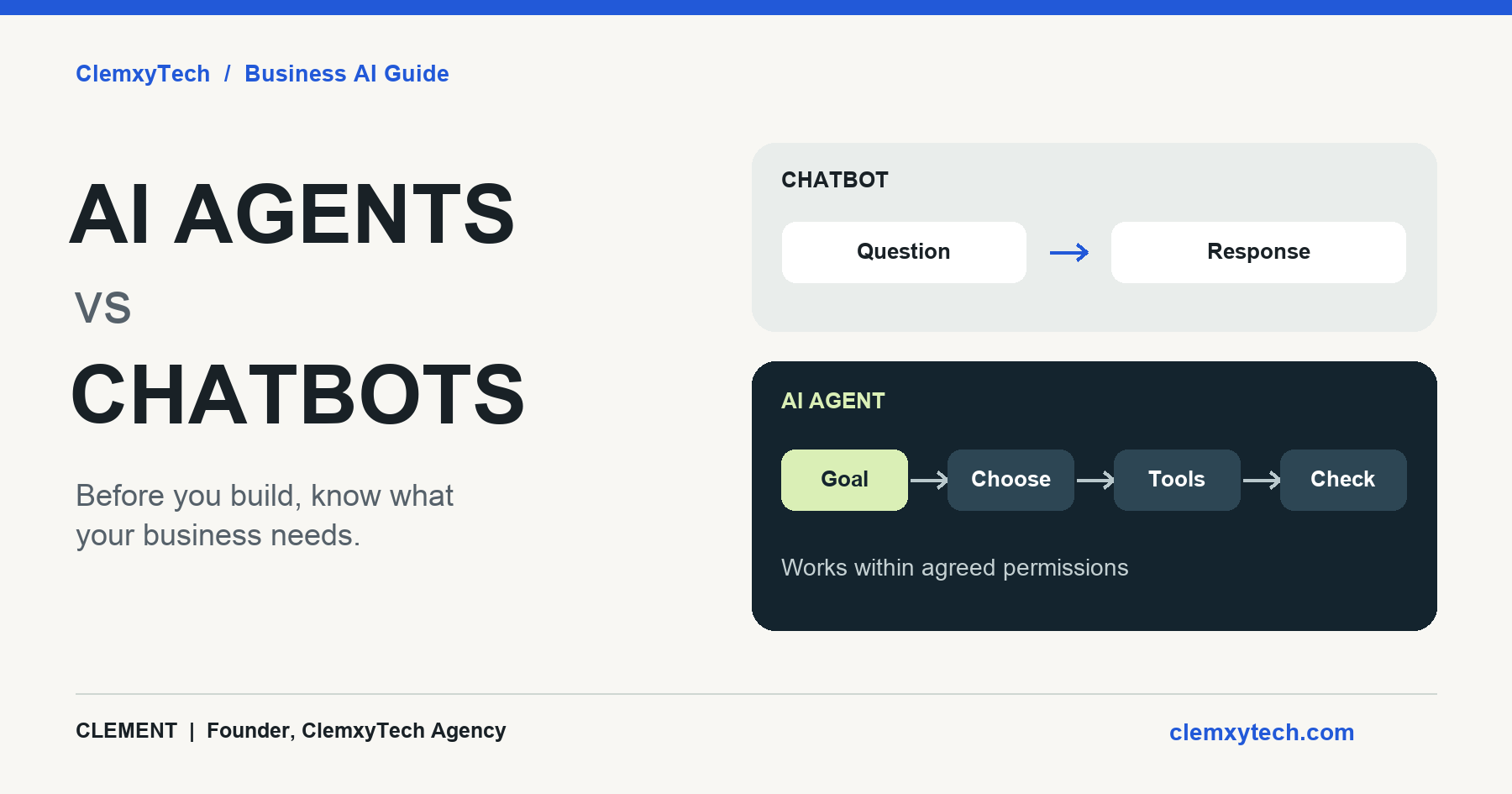
A chatbot is a conversational interface. Some follow scripts and menus. Others use AI to interpret a question and produce a response. Modern chatbots can also retrieve account information, create tickets, or start transactions through connected software. Having a chat window does not tell you how capable the system is. IBM’s overview of chatbots describes this range of capabilities.

An AI agent uses a model to help decide how to carry out a task. Given a goal, it can select tools, inspect the results, and choose what to do next within the limits you set. It might ask for missing information or stop for human input along the way. OpenAI’s practical guide to agents identifies model-directed workflow execution and tool use as central features.

There is also a useful middle ground: a fixed workflow with AI inside it. For example, AI can classify an enquiry, while ordinary software routes it to a department using rules you have already approved. The model helps interpret the message; your application still determines the sequence.

These categories overlap in real products. A chatbot can be the front door to an agent. A chatbot connected to one booking function may still follow a fixed process. Retrieving company documents to improve an answer does not, by itself, make a system an agent. Ask a supplier to show you who controls the next step, rather than relying on the product label.

Start with the work your team keeps repeating

Take a small consulting business that receives the same questions about services, locations, and how to get started. A well-maintained chatbot may handle those enquiries comfortably. Give it approved information and an easy route to a person when the conversation needs one.

For appointment requests, a structured form or a fixed booking workflow may be enough. If the steps are always the same, allowing a model to invent a new route adds little value.

An agent becomes more interesting when the next step depends on what it finds. Consider a sales assistant that reviews an enquiry, searches relevant project examples, identifies missing requirements, and prepares a tailored briefing for your team. Different enquiries could require different searches and follow-up questions. The useful outcome is a better-prepared human conversation.

Those are illustrative scenarios, not promises of what any particular product will deliver. Each one needs the right data, integrations, and testing. Anthropic’s guidance on building agents distinguishes predefined workflows from model-directed agents and recommends starting with the simplest approach that can do the job.

Our recommendation at ClemxyTech is to write down one recurring task before discussing tools. Who starts it? What information is needed? What counts as finished? Where does a person need to make a decision? A clear answer makes the technology choice much easier.

A convincing conversation is only part of the test

A demo can show a smooth answer without showing whether the underlying record was updated correctly. During a supplier demonstration, ask to see the actual result in the connected system. A message saying “your appointment is booked” should correspond to a real appointment.

Bring examples from your own business, including awkward ones. Try an incomplete enquiry, a request outside your services, an outdated policy, a disconnected calendar, and a customer who changes their mind. Check whether the system asks a sensible question, escalates, or quietly guesses.

Also ask what happens after a timeout. If a customer clicks twice, could two appointments or records be created? Who can spot the error and put it right? These are practical acceptance questions for your implementation team, even when the sales presentation concentrates on conversational quality.

Access to your business systems changes the responsibility

An AI system can produce an incorrect answer. Connecting it to customer records, email, or payment tools can turn that error into an action with wider consequences. Decide which actions it may take, which it may only prepare, and which require a person’s approval.

For an initial sales pilot, for example, you might permit the system to read selected service information and draft a response, while leaving proposal approval and sending with your team. Permissions should be enforced by the application and connected systems. A prompt telling the model to behave is only one part of the design.

External content introduces another risk. A message or document can contain instructions that try to redirect the model, a problem known as prompt injection. OWASP’s prompt-injection guidance explains why access restrictions, validation, separation of untrusted content, and human approval for sensitive operations matter. It also makes clear that retrieving documents or fine-tuning a model does not eliminate this risk.

Before connecting customer data, ask where it will be processed, who can access it, how long it will be retained, and how it can be deleted. Agree who owns the system after launch. The NIST Generative AI Profile is a useful reference for treating risk management as part of the system’s ongoing design, use, and evaluation.

Budget for a working service

The monthly software fee is only one line in the budget. Ask for the cost of connecting your systems, preparing business information, testing, staff review, monitoring, and maintenance. Usage charges may also include model calls and the tools the system invokes. An agent can make several calls while working through one request, so ask for a realistic usage estimate with clear assumptions.

A useful measure is the total operating cost divided by the number of tasks completed correctly. Include the time your team spends checking and fixing the output. A cheap conversation that creates extra work can be expensive in practice.

Agree a baseline before the pilot. You might measure how long your team currently spends preparing a qualified enquiry, then compare that with the pilot’s review time, corrections, and completed handovers. For a support chatbot, look at resolution quality and repeat contacts as well as response speed. Faster replies help only when customers can move forward.

Be cautious about a return-on-investment estimate built entirely on projected hours saved. Some time will move into supervision and upkeep. Use the pilot to find out how much work has actually been removed and whether your team can use the recovered time productively.

Give the pilot a clear boundary

Choose one service, one team, and a defined group of requests. Start with limited access. Have a named person review the results and a straightforward way to pause the system. Expand only when the evidence supports it.

Ask your implementation partner for a written description of the workflow, its data sources, the actions it can take, the approval points, and the handover process when it cannot continue. Include the measures you will review and the person responsible for keeping business information current.

You do not need to settle your entire AI strategy in the first project. A useful first result could be fewer repetitive questions, cleaner enquiry records, or a shorter preparation time before a sales call. Choose the outcome that matters to your business and build around it.

Let’s work out what your business actually needs

If you are considering a chatbot or an AI agent, bring us one task that is slowing your team down. Tell us what happens today, which tools are involved, and what you would like to improve. We can use the initial conversation to discuss scope, practical options, and a sensible starting point.

Want to know who you would be working with? Meet Clement, founder of ClemxyTech, and explore his work in AI, digital products, and quality assurance.

Our team responds to consultation enquiries within two business days. The initial conversation is free.

You may also find 5 Signs Your Business Needs Automation useful as you choose where to begin.